☁️ Dropbox
Start by instantiating the service:
val service = CloudBridge.dropbox()
Then, authenticate using the platform-specific methods below. Once authenticated, the shared API is available.
Compatibility
Dropbox paths are case-insensitive, meaning /Folder/File.txt and /folder/file.txt refer to the same file.
Registration in App Console
Info
Your app needs to be registered in the Dropbox App Console.
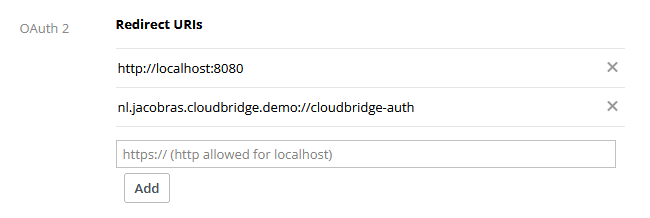
Make sure to register the redirect URIs there:
Authenticating
Set up a deeplink filter inside AndroidManifest.xml:
<!-- OAuth redirect deep link: com.example.myapp://cloudbridge-auth -->
<intent-filter>
    <action android:name="android.intent.action.VIEW" />
    <category android:name="android.intent.category.DEFAULT" />
    <category android:name="android.intent.category.BROWSABLE" />
    <data android:scheme="com.example.myapp" android:host="cloudbridge-auth" />
</intent-filter>
The redirect URL needs to be configured in the service's API console. The recommended format for
CloudBridge is com.example.app://cloudbridge-auth, where com.example.app matches your app's
identifier, but there's no hard requirement for this structure.
Open the auth URL in a Custom Tab and capture the redirect. Then exchange the authorization code for a token:
// When user wants to authenticate:
val url = service.authenticate(
    clientId = "yourClientId",
    redirectUri = "yourRedirectUri" // e.g. a custom scheme like "com.example://cloudbridge-auth"
)
CustomTabsIntent.Builder().build().launchUrl(context, url.toUri())

// In your Activity's onNewIntent (and onCreate), call:
val uri = intent.data ?: return
val token = service.completeAuthentication(
    clientId = "yourClientId",
    redirectUri = "com.example.app://cloudbridge-auth", // Needs to match the uri passed into authenticate()
    intentUri = uri
)
Securely store the token and pass it to the constructor of the service to use it.
service.authenticate(
    clientId = "yourClientId",
    redirectUri = "com.example.app://cloudbridge-auth" // change to your app
)?.let { token ->
    service.setToken(token)
    TODO("Store the token locally")
}
The redirect URL needs to be configured in the service's API console. The recommended format for
CloudBridge is com.example.app://cloudbridge-auth, where com.example.app matches your app's
identifier, but there's no hard requirement for this structure.
val authServer = LocalAuthenticationServer() // optional parameter: `port=8080`

// Build auth URL and open it in the browser
val url = service.authenticate(
    authServer = authServer,
    clientId = "yourClientId",
    onSuccess = { token ->
        service.setToken(token)
        TODO("Store the token locally")
    }
)
openBrowser(url)
The redirect URL needs to be configured in the service's API console. Since CloudBridge on desktop
uses a loopback server, the URL will be http://localhost:8080 (or whichever port you specify).
// Always call this:
val token = service.completeAuthentication()
if (token != null) {
    service.setToken(token)
}

// When user wants to authenticate:
val uri = service.authenticate(
    clientId = "yourClientId",
    redirectUri = "yourRedirectUri"
)
window.location.href = uri
The redirect URL needs to be configured in the service's API console. For example,
https://example.com/cloudbridge-callback, where https://example.com matches your app's domain,
but there's no hard requirement for this structure.