☁️ OneDrive
Start by instantiating the service:
val service = CloudBridge.oneDrive()
Then, authenticate using the platform-specific methods below. Once authenticated, the shared API is available.
Registration in App Console
Info
Your app needs to be registered in the Microsoft Azure Portal.
Make sure to register the redirect URIs there:
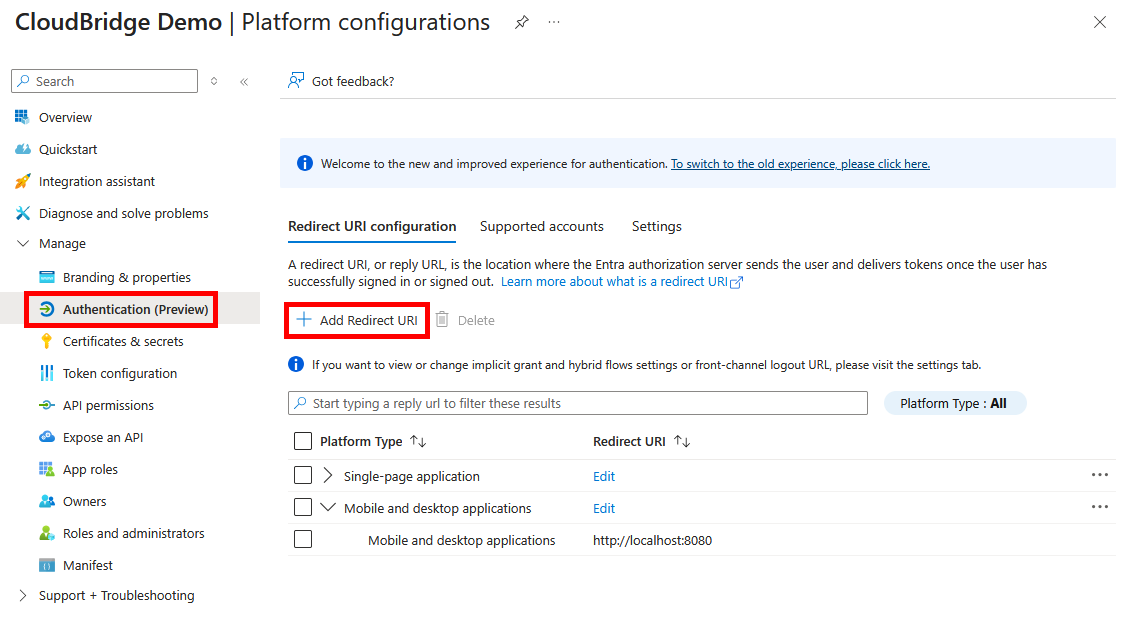
For web, choose Single-page application as the platform.
Authenticating
Set up a deeplink filter inside AndroidManifest.xml:
<!-- OAuth redirect deep link: com.example.myapp://cloudbridge-auth -->
<intent-filter>
    <action android:name="android.intent.action.VIEW" />
    <category android:name="android.intent.category.DEFAULT" />
    <category android:name="android.intent.category.BROWSABLE" />
    <data android:scheme="com.example.myapp" android:host="cloudbridge-auth" />
</intent-filter>
The redirect URL needs to be configured in the service's API console. The recommended format for
CloudBridge is com.example.app://cloudbridge-auth, where com.example.app matches your app's
identifier, but there's no hard requirement for this structure.
Open the auth URL in a Custom Tab and capture the redirect. Then exchange the authorization code for a token:
// When user wants to authenticate:
val url = service.authenticate(
    clientId = "yourClientId",
    redirectUri = "yourRedirectUri" // e.g. a custom scheme like "com.example://cloudbridge-auth"
)
CustomTabsIntent.Builder().build().launchUrl(context, url.toUri())

// In your Activity's onNewIntent (and onCreate), call:
val uri = intent.data ?: return
val token = service.completeAuthentication(
    clientId = "yourClientId",
    redirectUri = "com.example.app://cloudbridge-auth", // Needs to match the uri passed into authenticate()
    intentUri = uri
)
Securely store the token and pass it to the constructor of the service to use it.
service.authenticate(
    clientId = "yourClientId",
    redirectUri = "com.example.app://cloudbridge-auth" // change to your app
)?.let { token ->
    service.setToken(token)
    TODO("Store the token locally")
}
The redirect URL needs to be configured in the service's API console. The recommended format for
CloudBridge is com.example.app://cloudbridge-auth, where com.example.app matches your app's
identifier, but there's no hard requirement for this structure.
val authServer = LocalAuthenticationServer() // optional parameter: `port=8080`

// Build auth URL and open it in the browser
val url = service.authenticate(
    authServer = authServer,
    clientId = "yourClientId",
    onSuccess = { token ->
        service.setToken(token)
        TODO("Store the token locally")
    }
)
openBrowser(url)
The redirect URL needs to be configured in the service's API console. Since CloudBridge on desktop
uses a loopback server, the URL will be http://localhost:8080 (or whichever port you specify).
// Always call this:
val token = service.completeAuthentication()
if (token != null) {
    service.setToken(token)
}

// When user wants to authenticate:
val uri = service.authenticate(
    clientId = "yourClientId",
    redirectUri = "yourRedirectUri"
)
window.location.href = uri
The redirect URL needs to be configured in the service's API console. For example,
https://example.com/cloudbridge-callback, where https://example.com matches your app's domain,
but there's no hard requirement for this structure.